There are no products listed under this brand.
Connection management
Manage video, audio and data routing across supported baseband and IP systems. Give operators a consistent view of connections within a facility or between production locations.


Give operators a clear interface for everyday production tasks. The hi range brings touchscreen control to supported broadcast and AV equipment, with layouts tailored to the operator's workflow.
hi human interface
Bring routing, tally and device control into an interface built around the operator. hi visualises connected systems so teams can see what is available and manage everyday production tasks.
Explore the official hi websiteBuilt around production workflows
Manage video, audio and data routing across supported baseband and IP systems. Give operators a consistent view of connections within a facility or between production locations.
Keep camera status, on-air indications and cues visible to the team. Configure tally logic and follow-up actions around supported vision mixers, multiviewers and GPIO interfaces.
Bring supported device parameters into a common interface. Choose touchscreen operation or physical buttons and rotary encoders to suit the way each operator works.
Link routine production actions with configurable rules, groups and tags. Use guided connections and follow-up actions to reduce repetitive steps during everyday operation.
Operator hardware
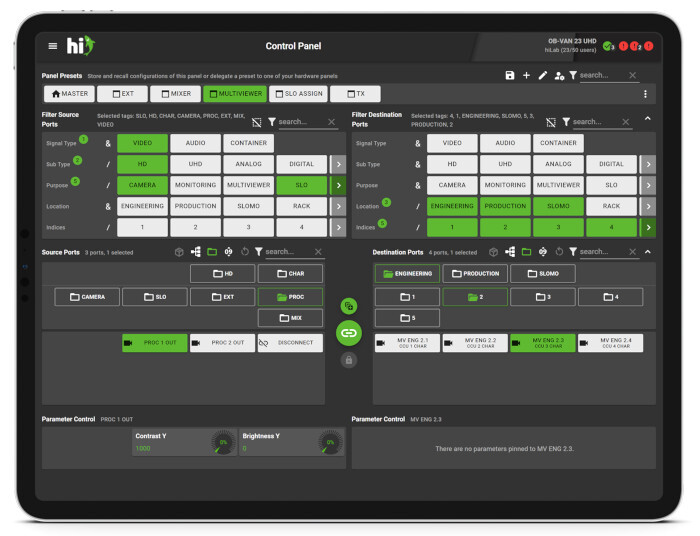
An Apple iPad 10.2-inch preconfigured to operate a hi system, bringing touchscreen control to the operator's position.
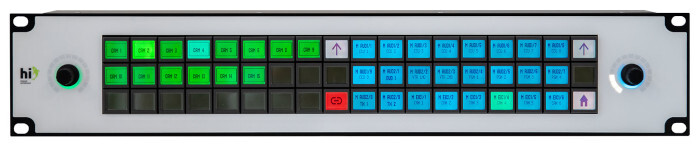
A 2RU control panel with 54 high-contrast LCD buttons and two rotary push encoders for hands-on operation.
Confirm current hardware options, software licensing and device compatibility with OnAir before ordering.
Product selection and support
Tell us which devices you need to control, how your operators work and which interfaces you use. Talk to OnAir about product options, licensing and a quote.
There are no products listed under this brand.