
Product Overview
Dyna View Pro - Multi-protocol Multi-view Monitoring Software
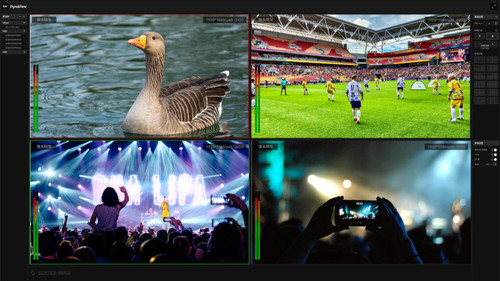
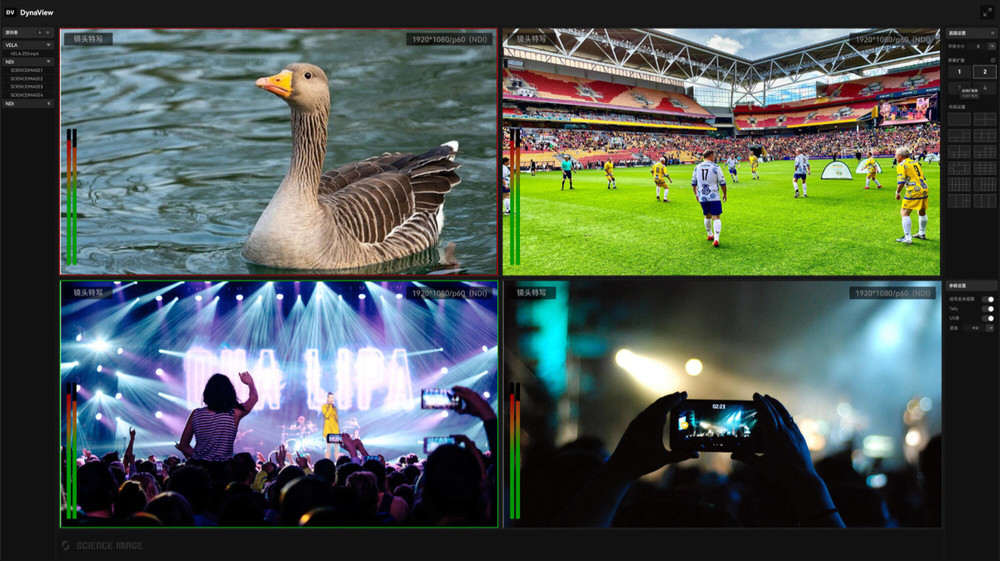
Multi-Screen Monitoring & Large Screen Output
Dyna View enables multi-screen output to large screens via Graphics card, with customized layout for each output channel. This meets the demand for multi-screen and large-window monitoring.Signal Freedom, Control At Will
Users can select any signal source per window, and mix different protocols within a single layout.Multi-Protocal Signal Input
Dyna View supports FULL NDI, NDI HX2, NDI HX3, RTMP, RTSP, SRT, HTTP, and other protocol-based signal inputs, covering nearly all common video industry standards.Signal Monitoring & Alerts
Dyna View monitors all window signals in real-time. If any signal source is lost, the corresponding window will immediately display "No Signal" and trigger an audible alarm, eliminating the need for staff to constantly monitor the screens—truly achieving intelligent operation.Screen Recording
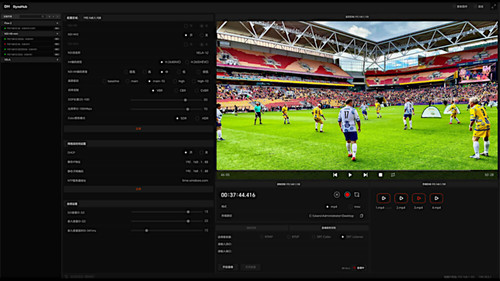
Dyna View supports full-scene recording. With a single click, all monitored screens can be simultaneously recorded into one video file, perfectly reproducing multi-angle scenarios. They also support individual recording. Specific important screens can be recorded separately to save storage space and facilitate post-production fine-tuning.PTZ Camera Control
Dyna View enables PTZ control across all windows, including: Focus adjustment(+/-), Zoom (Push/Pull), Pan/Tilt, Speed control(fast/slow), Preset position saving/recall.Multi-View NDI Output
Dyna View supports outputting multi-view layouts as a full 4K NDI stream. By leveraging the network, the global monitoring screen is transmitted as a PGM signal in real time, allowing remote personnel to synchronously access and monitor the feed.Source Data Display
Dyna View monitors each window's signal source data, including resolution, frame rate, source name, audio bitrate, and channel count, ensuring all critical information is clearly visible at a glance.Preset Saving & Recall
Allow users to save custom layouts with selected signal sources as presets, enabling quick recall for future use. This feature streamlines workflow by eliminating repetitive setup steps.Feature summary:
- 96-Channel Monitoring
- Custom Layout
- Single-Channel Multi-view
- Recording
- PTZ Control
- Multi-view Graphics Output
- Signal source supports horizontal and vertical screen modes
For more information on the Science Image Dyna View Pro - Multi-protocol Multi-view Monitoring Software, click here!
Warranty Information
12 Month Limited Manufacturer's Warranty. If you need contact us with an issue, please send an email to support@onair.com.au with the serial number or invoice number to create a support case.